Selected work
01 / Work · Featured client case study
Che Bella Donna
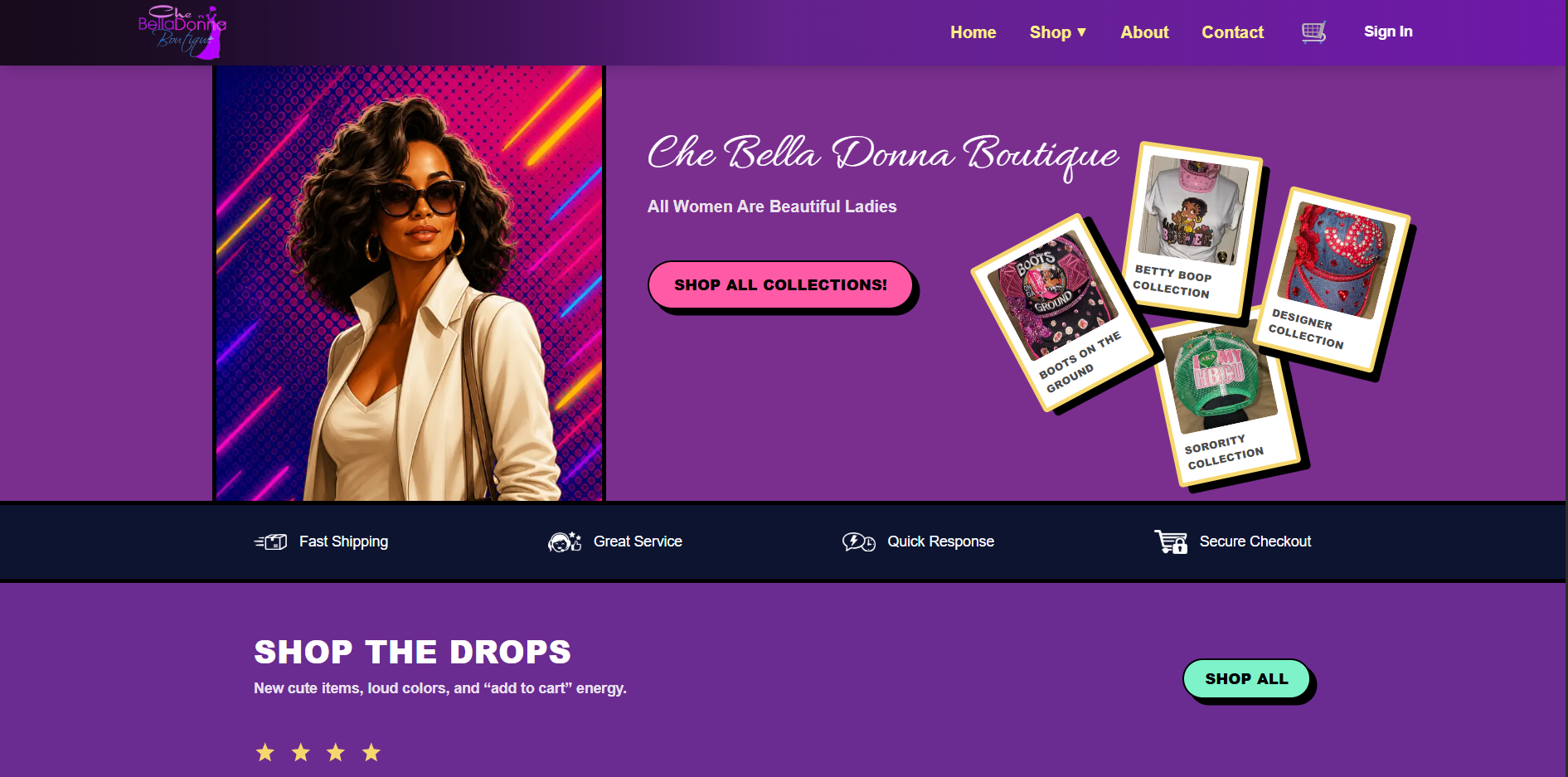
Commerce & business operations
Che Bella Donna
A boutique storefront connected to the tools for running the business—inventory, pricing, checkout, orders, and administration.
My contribution through Kairo: backend development, admin design, and functionality. Branding and frontend design: Lex & Hue.
More work / 1 of 2
Built around the business
More work / 2 of 2
Products & connection
Che Bella Donna / 1 of 5
01 / The business need
A storefront. An owner’s platform.
Che Bella Donna needed more than a place to display boutique fashion. The customer experience had to connect to the practical work of keeping products, sizes, pricing, and orders up to date.
The connection matters
A product is more than its storefront image. Available sizes, stock, collection membership, and active discounts all shape what a customer can browse and buy.
Customer experience
Find it. Choose it. Buy it.
Products & collections → Cart → Checkout → Account & orders
Business operations
Manage what makes it work.
Catalog & images → Stock & promotions → Orders & fulfillment
Che Bella Donna / 2 of 5
02 / My contribution
Distinct contributions. One connected product.
Through Kairo Collective Studio, I developed the backend and designed and built the admin experience. Lex & Hue handled branding and frontend design. The work connected the boutique’s public-facing experience with the tools behind it.
Where my work connects
My contribution focused on the systems behind the storefront and the owner’s workspace: turning catalog updates, pricing rules, customer information, and orders into connected application workflows.
The Collaboration
Backend & Admin
Backend development, admin interface design, and functionality.

Brand & Storefront
Branding and frontend design.
Explore the studios through their logos ↗
Che Bella Donna / 3 of 5
03 / Owner tools
Give the owner practical control.
The admin workspace brings the catalog and day-to-day operations together. Product changes connect to the stock, promotions, and information that customers see in the storefront.
- Catalog & inventory
- Product images, per-size stock, one-of-a-kind items, and collection assignments support the way the boutique manages its merchandise.
- Promotions & pricing
- Product, category, and collection discounts feed centralized pricing logic rather than isolated display-only sale labels.
- Operations & guidance
- Order and shipping tools, customer inquiries, analytics, and in-app help extend the workspace beyond product editing.
Che Bella Donna / 4 of 5
04 / Customer flow
Discovery. Checkout. Continuity.
The shopping experience connects product discovery to cart, payment, and the customer’s account. Behind those screens, inventory and pricing rules help keep the purchase connected to the actual catalog.
Discover
Browse products through categories and collections, with sizes, stock, and sale pricing connected to the catalog.
Purchase
Carry selections into a persistent cart, validate stock, calculate shipping, and continue to Stripe checkout.
Continue
Customer accounts connect profile and shipping information with order history and tracking details.
Che Bella Donna / 5 of 5
05 / Delivery & handoff
Built to operate after launch.
The May 18, 2026 handoff brought the storefront and operational tools together, with documentation to support the client’s ongoing use of the platform.
Client handoff / May 18, 2026
Owner-managed tools
The client can maintain products and content, manage promotions, and work with orders through the admin platform.
Documentation & guidance
Admin guidance and technical documentation support the handoff. In-app help gives the owner another route to understanding routine operations.
A connected foundation
Next.js and TypeScript connect the application with MongoDB, Stripe payments, Cloudinary media, and transactional email.
Mariposa’s Garden / 1 of 6
Wellness platform · Live MVP / Evolving
A wellness platform built around the practice.
The public experience helps visitors explore services and request appointments. Behind it, a protected admin workspace supports scheduling, client context, and session resources.
- Individual appointments and multi-session programs
- Public client experience connected to internal operations
- Build what fits the practice—not features for their own sake
Workflow summary · Not an interface screenshot
- Explore a wellness service
- Request an appointment
- Manage the ongoing client workflow
Mariposa’s Garden / 2 of 6
Wellness platform · Live MVP / Evolving
A clear next step for the client.
The client-facing booking page connects service discovery to preferred-date and time selection. Submitting a request is distinct from appointment confirmation or verified payment.
- Public calendar and available-time selection
- A booking experience consistent with the wellness brand
- Clear boundaries between request, confirmation, and payment
Public date and time selection. Selecting a slot does not itself confirm an appointment or complete payment.
Mariposa’s Garden / 3 of 6
Wellness platform · Live MVP / Evolving
The workflow shapes the tools.
The owner can record appointments received by phone, referral, or in person—not only requests originating online. The form reflects how this client actually works.
- Service or package context and flexible multi-session plans
- Pending status and an explicit confirmation-inquiry choice
- Requested time, calculated end time, and internal notes
Admin appointment-creation form.
Mariposa’s Garden / 4 of 6
Wellness platform · Live MVP / Evolving
Protect time for the work.
Full-day closures and specific-time blocks accommodate exceptions to the practice’s schedule. Public preferred-time selection and administrative control support different parts of booking.
- Block a full day or a specific time window
- Keep requests, appointment confirmation, and payment states distinct
- Fit scheduling controls to business constraints
Availability interface shown as provided. This screenshot does not establish that regular hours are configured.
Mariposa’s Garden / 5 of 6
Wellness platform · Live MVP / Evolving
Support the relationship—not just the booking.
Client profiles, appointment history, notes, and private worksheets support continuity before and after a session. These capabilities can be explained without publishing private records.
- Keep relevant context connected to the client
- Separate assigning a worksheet from explicitly sending it
- Protect private information while explaining the workflow
Workflow summary · Not an interface screenshot
- Client context
- Appointments & session history
- Notes & session resources
Mariposa’s Garden / 6 of 6
Wellness platform · Live MVP / Evolving
Extend what fits. Not everything at once.
The working MVP supports booking and administration. Current development extends that foundation; larger capabilities remain separately scoped.
- Payments: local invoice drafts exist; provider-connected processing and reconciliation remain unfinished
- Email: consent and queue foundations exist; delivery acceptance, recovery, and admin controls remain
- Future: learning portal, digital fulfillment, and broader CRM need separate approval
Workflow summary · Not an interface screenshot
- Working MVP
- Current payment & email work
- Separately scoped future products
Chaos Coordinator / 1 of 4
Client case study · Focused business website
A clear presence. A platform of their own.
A small service business does not need the fanciest features to communicate its value. Chaos Coordinator gives the brand a dedicated place to explain its services and help customers take the next step.
- A dedicated presence for the business and its brand
- Clear offers and a path toward pricing or inquiry
- Ownership as purpose—not an invented CMS or contractual claim
Chaos Coordinator / 2 of 4
Client case study · Focused business website
Different needs. Clear service paths.
The KCS case study organizes the experience around residential, commercial, and specialty cleaning. Visitors can identify the relevant service rather than sort through an undifferentiated list.
- Residential cleaning for the home
- Commercial cleaning for business spaces
- Specialty services for other needs
Workflow summary · Not an interface screenshot
- Recognize the need
- Find the relevant service
- Explore pricing or inquire
Chaos Coordinator / 3 of 4
Client case study · Focused business website
From first impression to the next conversation.
The homepage, business information, specials, and contact path support different parts of a customer’s decision. The site has a practical role beyond listing services.
- Homepage: brand promise and discovery
- About: business context and trust
- Specials and contact: useful next steps
Workflow summary · Not an interface screenshot
- Meet the brand
- Understand the offer
- Start a conversation
Chaos Coordinator / 4 of 4
Client case study · Focused business website
Focused scope is a design decision.
The build prioritizes a clear online presence and useful customer pathways, with room to grow when the business needs it—not complexity to make the project appear larger.
- Surface pricing pathways early
- Keep service navigation straightforward
- Room for approved proof, FAQs, imagery, and richer service detail
Workflow summary · Not an interface screenshot
- What the business needs now
- A focused website
- Growth when it becomes useful
KinFlow / 1 of 1
Product work · Preview
Make relationships easier to understand.
A family-tree and relationship platform connecting family stories and shared history.
- Structured family connections
- Approachable documentation of shared history
- Preview; the fuller KCS case study is not yet documented
DevUniverse Portal / 1 of 4
Independent product · In development
A workspace shaped around the developer.
DevUniverse Portal brings working platform launch links, code capture, notes, and task management into one configurable Next.js and TypeScript workspace.
- 13 launch tiles linked to developer platforms, AI assistants, and development tools
- Configurable module visibility and on-demand workspace surfaces
- Working workspace tools with browser-persisted notes and task history
DevUniverse Portal command-center overview.
DevUniverse Portal / 2 of 4
Independent product · In development
Capture an idea. Keep the context.
The Notes workspace pairs a composer with timestamped saved-note history. The inspected implementation persists notes locally in the browser.
- Compose, save, and delete notes
- Timestamped saved-note history
- Browser-local persistence—not cross-device sync
Actual Notes workspace with source-provided example notes.
DevUniverse Portal / 3 of 4
Independent product · In development
Keep build material close to the workflow.
The Capture view presents a language-selectable code-entry surface, separate from Notes and Tasks. This demonstrates the visible workspace without inventing connected-agent behavior.
- Language selector and code-entry surface
- Capture and History controls visible in the interface
- On-demand workspace rather than an always-open panel
DevUniverse Portal / 4 of 4
Independent product · In development
One shell. Separate capabilities and skins.
The repository separates shell, modules, widgets, and theme tokens. Spotify integration code includes OAuth routes, token refresh, playback state, and controls.
- Next.js · React · TypeScript · Tailwind CSS
- Cosmic, Forest, and Solar theme-token architecture
- Spotify OAuth and Web Playback SDK implementation
Workflow summary · Not an interface screenshot
- Application shell
- Workspace modules
- Theme tokens & integration code